Extend The Life of Your Print
Head
with Save-A-PrintHead Cleaning Film
Challenge
The print head is the most critical component in your printer, and possibly the most delicate. It is a consumable item just like the brakes on your car, which will eventually wear over time. However, with ongoing careful attention and maintenance, you can extend the life of the print head!
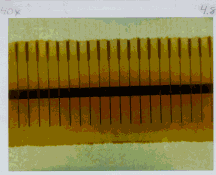
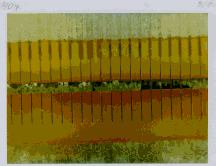
Below are photographs of three print heads. The first print head is brand new. The second has printed over 1 million linear inches of thermal transfer labels and has been properly maintained. The third print head has printed far fewer labels, but without proper care and maintenance, signs of abrasion and contamination build-up are evident.
 |
|
 |
New |
Over
1 Million Inches |
Less
Than 1 Million Inches |
Preventive Maintenance
For optimum performance, clean the printhead regularly after every roll of thermal transfer ribbon or after every roll of direct thermal labels. Take care when handling or cleaning the printhead by removing any jewelry
that may scratch the printhead, and use a grounding strap or anti-static mat to discharge static electricity that could damage the printhead.Note: You are not required to turn off the printer power for this procedure. Remove all rings, watches, hanging necklaces, identification badges, or other jewelry that could touch the print head or get caught in the printer. If you turn off the power, you will lose all temporary settings, such as label formats, and you must reload them before you resume printing.
(Note: For later model 600 dpi printers, clean after each roll of media or when a "CLEAN HEAD NOW" warning appears on the liquid crystal display (LCD).
To start, use only the pre-soaked (99.7% isopropyl alcohol) cleaning swabs provided in the preventive maintenance kit (P/N 47362). Open the media cover to access the printhead, then open the printhead. Lightly blow or brush away any loose dust and lint particles within the print mechanism (such as rollers, media/ribbon sensors, and printhead). NEVER use any hard, metallic, or abrasive objects—such as a screwdriver—to remove adhesives or other contaminants that may have built up on the printhead. Next, press the swab tip against the printhead and swipe the print elements from end to end. Finally, turn the platen rollers while wiping them from side to side. Repeat this last step until the swab no longer shows dirt.
Avoid the Contributing Factors to Premature Print Head Failure
Abrasion- Over time, the movement of media/ribbon across the print head will wear through the protective ceramic coating, exposing and eventually damaging the print elements (dots).
In order to avoid abrasion:
- Clean your print head frequently and use well-lubricated thermal transfer ribbons with back coatings optimized to reduce friction.
- Minimize print head pressure and burn temperature settings by optimizing the balance between the two.
- Ensure that the thermal transfer ribbon is as wide or wider than the label media to prevent exposing the elements to the more abrasive label material.
Ribbon Back coating and Buildup: Printhead contamination from direct thermal media or thermal transfer ribbon may occur in applications requiring high burn settings, high head pressure, high speed, or high volume. This contamination builds up on the printhead elements, creating a barrier to the heat transformation required to produce high-quality images. Contaminant buildup occurs gradually and results in poor print quality that may look like faded print or failed print element(s). This buildup is very resistant to cleaning with pre-soaked swabs and is difficult to remove.
In order to avoid back coating buildup:
- Use thermal transfer ribbons or direct thermal media that have been specially cured to provide back coat protection for high demand applications. These ribbons—sometimes referred to as anti-stick ribbons—also dissipate static and provide more lubrication.
- Follow the recommended Print Head Preventive Maintenance procedures.
- Use our Save-a-PrintHead cleaning film to remove print head contamination buildup quickly and easily.
Save-a-PrintHead Cleaning Film
Save-a-Printhead
cleaning film is a specially coated film that removes contamination buildup without damaging the printhead.Save-a-Printhead cleaning film extends the life of your printhead, reduces maintenance downtime and the cost of replacing a printhead, and is an inexpensive, easy, and quick way to remove contaminants without removing the printhead.
Use Save-a-Printhead cleaning film when you see degrading print quality that looks like faded print or a failed print element(s) that cannot be corrected by cleaning with the pre-soaked cleaning swabs.
NOTE:
For 600 dpi printheads, use Save-a-Printhead cleaning film after every roll of media or when the printer LCD shows a "CLEAN HEAD NOW" warning.How to Use Save-a-PrintHead Cleaning Film
NOTE:
If power is removed from a later model 600 dpi printer when cleaning the printhead, the "CLEAN HEAD NOW" warning shown on the LCD will not disappear.- Open the media cover.
- Open the printhead, remove media and ribbon from the print mechanism.
- Clean the print head per the recommended Preventive Maintenance procedures.
- Position the Save-a-Printhead film in the print path, placing the glossy side down away from the printhead (matte side up).
- Close and latch the print head.
- Slowly pull the full length of the film through the print mechanism.
- Clean the printhead a second time per the recommended Preventive Maintenance procedures.
- Reload media and ribbon, close and latch the print head.
- Close the media cover.
- Print labels and inspect for improved print quality. If quality has not improved, contact your distributor or Zebra Technical Support.
Only one pass of
Save-a-Printhead film is required to remove contamination buildup, and each strip of film can be used up to 10 times. Discard the strip when residue buildup or other contamination is apparent.If a replacement printhead is needed, Zebra strongly recommends using a product from the Original
Equipment Manufacturer (OEM) to ensure that your printer and part warranties remain intact and that the product performs optimally.How to Order Save-a-PrintHead Cleaning Film Kits
There are 5 kits to accommodate the different width printers. Each kit contains three 10" long strips of film. Reference the following table to order the kit for your printer:
Order kit number: For Printers with Print Widths:
46902 3.0" – 4.0" (76 mm–102 mm)
44902 4.0" – 5.0" (102 mm - 127 mm)
48902 5.0" – 6.0" (127 mm - 152 mm)
38902 6.0" – 7.0" (152 mm - 178 mm)
22902 8.0" – 9.0" (178 mm - 229 mm)
5/3/02