Cleaning The Zebra Printhead


Inconsistent print quality such as voids in the bar codes or
graphics may indicate a dirty Printhead. For optimum performance,
the printhead should be cleaned regularly. Zebra Technologies
Corporation recommends performing the cleaning procedure when
installing a new Roll of Ribbon or after 3 rolls of label stock.
Note: You are not required to turn off the printer power for this
procedure. Remove all rings, watches, hanging necklaces, identification
badges, or other jewelry that could touch the print head or get caught in the
printer. If you turn off the power, you will lose all temporary settings, such
as label formats, and you must reload them before you resume printing.
Click
here for information on extending the life of your printhead.
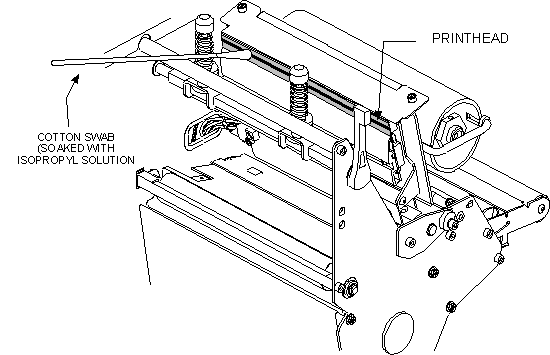
Printhead Cleaning Procedure:
1. Open the Printhead by moving the Printhead Lever to the OPEN
position.
2. Remove the media and ribbon (if present).
3. Use a cleaning swab (99.7% Pure Alcohol) and wipe the print elements from end to
end. (The print elements are the grayish/ black strip just behind
the chrome strip on the underside of the Printhead.) Allow a few
seconds for the solvent to evaporate.
4. Rotate the Platen Roller and clean thoroughly with a cleaning
swab.
5. Brush or vacuum any accumulated paper lint and dust away from
the Rollers
and the Media and Ribbon Sensors.
6. Reload ribbon and/ or media, close and latch the Printhead,
restore power
(if necessary) and run the PAUSE Key self test to check print
quality.
Click
here for Pens and Kits information